Silver Box closes on 30 September 2026. eBox is the training platform it becomes — a fuller learning management system with a larger training library, certificates issued the moment a course is completed, and compliance reporting your managers can actually use. Moving early gives your team time to settle in before the deadline.
Nothing needs to happen today. But two deadlines sit ahead of the closure, and both are easier to meet with time in hand.
Last day to submit exams for marking. Anything sent after this date can't be marked before Silver Box closes.
Silver Box closes. Download any certificates you need to keep by this date.
Moving to eBox before September means your team learns the new system in a normal week, not in the last one.
A short walkthrough of the platform your team will be using: finding a course, completing it, and the record it leaves behind.
Covering a wider range of care roles, and kept current with sector guidance and best practice — so training doesn't quietly go out of date between refreshes.
No waiting for a marking cycle. A member of staff finishes a course and the certificate is there, in their record, the same minute.
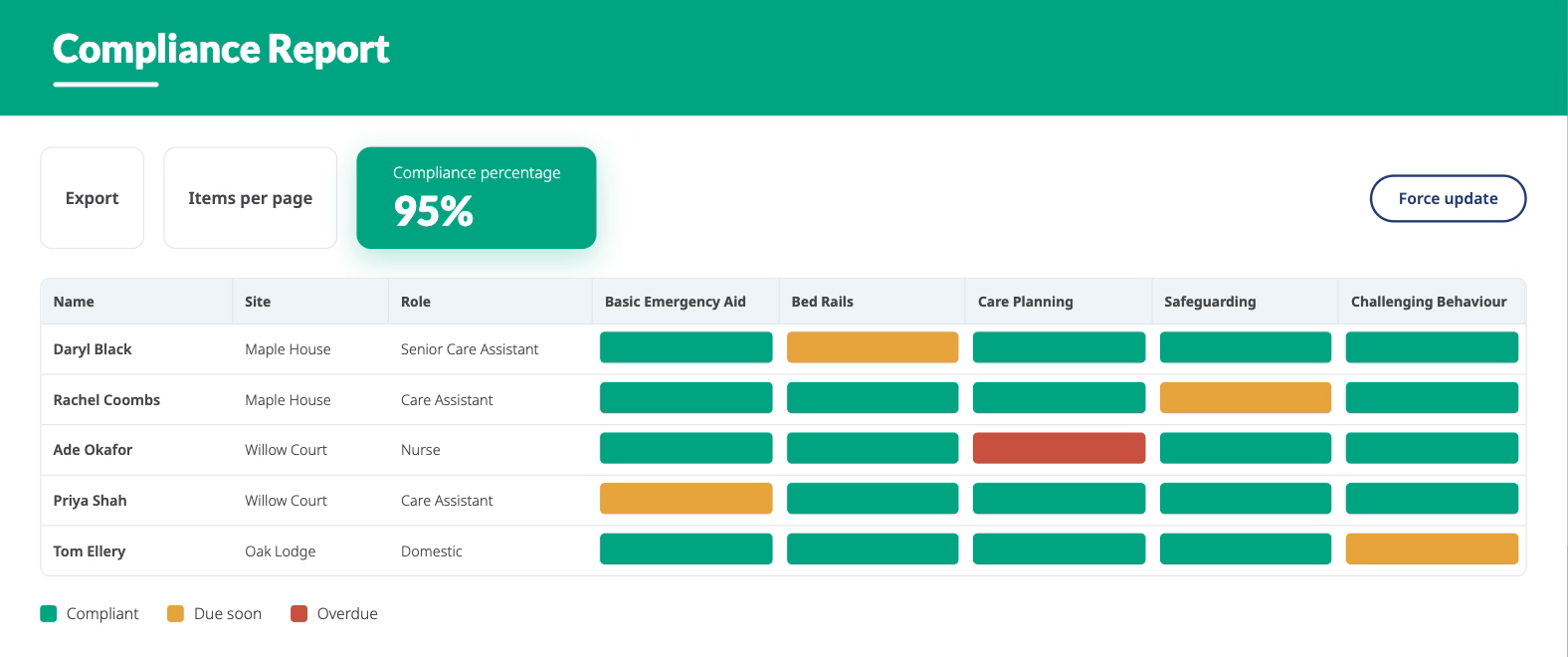
See completions, gaps and upcoming refreshers in one view, so preparing for an inspection isn't an evening of cross-referencing spreadsheets.
16 core manuals are already available in eBox, so the material your team knows comes with them.
Silver Box did one job well: distance learning, marked and certificated. eBox keeps that and adds the management layer around it.
| Feature | Silver Box | eBox |
|---|---|---|
| Training material | Downloadable materials | Online training material and app |
| Compliance reporting | Basic | Advanced |
| Certificates | Certificate storage | Certificate storage, plus instant issue on completion |
| Staff management | Not included | Included |
| Events | Not included | Included |
| File sharing | Not included | Included |
| Translation | Not included | Included |
| Mobile app | Not included | Included |
There's no build phase and no data to prepare. Three steps, and we do most of them.
Fill in the form below or speak to your account manager. We confirm your courses and licence numbers.
Your staff, courses and refresher dates are configured for you. You get admin access and a walkthrough.
Staff log in and begin. Certificates and reporting build from the first completion.
Ongoing support is included — a named team you can reach by phone, email or Teams during office hours, at no extra cost.
Download anything you need to keep before 30 September 2026. We can help you export in bulk.
16 core manuals are already available digitally in eBox.
eBox is designed to be picked up without training. There's a walkthrough at setup and guides available at any time.
Yes, and we'd encourage it. Moving early avoids the rush ahead of the deadline.
Yes. eBox is a Person Centred Software training platform, delivered by the team you already work with. It comes from Redcrier, now part of Person Centred Software.

Tell us you're ready and we'll set your eBox up, or ask us anything first — same form either way.
No cost to discuss Supported setup Ongoing support included



.webp?width=80&height=80&name=HTD%20Awards%202023%20Badge%20(4).webp)